Pinterest keyword research, and where the keywords actually go.
I've spent twelve years doing search engine optimization — keyword strategy, content, the technical side. Then I started taking Pinterest seriously for my own business and realized something that should have been obvious: almost nobody treats Pinterest like the search engine it is.
People write pins the way they write Instagram captions. Warm, chatty, and invisible to search. Then they wonder why a decent post gets forty impressions.
But there's a second problem underneath that one, and it's why a lot of well-keyworded pins still go nowhere: people put the right words in the wrong place.
First: boards and pins do different jobs
This is the part that changes how you do everything else.
Your boards establish what your account is about. They're the stable layer. A board's title and description rarely change, and over time they tell Pinterest which topics you publish in — which is what makes your account credible in a category rather than a random collection of images.
Your pins target specific searches. They're the moving layer. Each one goes after a particular phrase someone typed. One board can support dozens of pins chasing dozens of phrasings of the same topic.
| Surface | Job | Keyword type |
|---|---|---|
| Board | Establishes the topic | Broad, category-level |
| Pin | Targets a search | Specific, long-tail |
A board called Small Kitchen Storage can hold a pin about pantry zones, one about drawer dividers, one about a fifteen-minute counter declutter, and one about renter-friendly shelving. Four searches, one topic, one board.
Get this backwards and you get boards full of pins that go nowhere.
Naming your boards
Aim for three to five words. Not a rule, but a good default. A one-word board — Food, Home, Tea — gives Pinterest almost nothing. Small Kitchen Storage Ideas tells it exactly which searches you're relevant to.
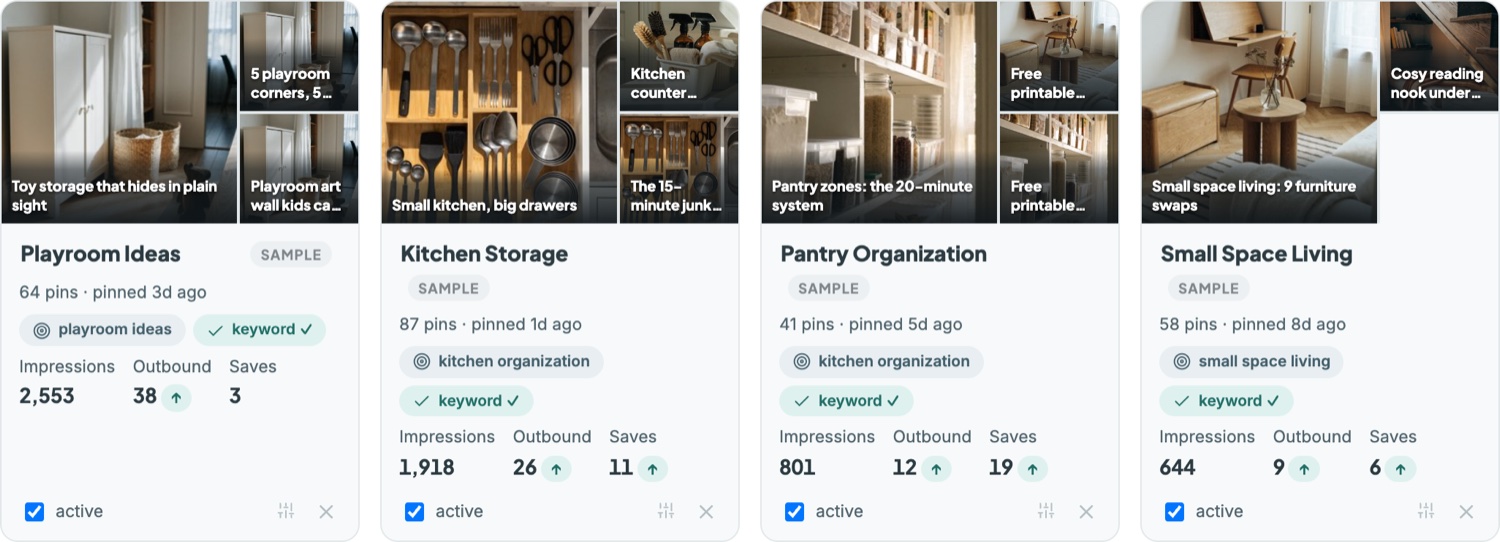
And don't go too specific either, which is the mistake people make once they've heard the first half of this advice.
Here's why, and it's the part almost nobody mentions: if you name a board Best Green Tea Recipes 2026, you'll want to rename it next January. And when you rename a board, Pinterest reindexes it — the reach that board and its pins built up gets interrupted.
A date in a board title is a bill you pay next January, in reach.
So keep dates, years and hyper-specific angles at the pin level, where a pin's job is finite anyway. Let the board stay evergreen. Green Tea Recipes can carry pins about 2026 trends without ever needing renaming.
Write the board descriptions. Most people don't.
This is the most common gap I see, and it's free to fix.
A board description tells Pinterest what the topic covers and which adjacent terms belong to it. Two or three sentences using related language — for a small-kitchen-storage board that might be organization, small space living, rental-friendly, pantry — and it helps every pin on that board, not just the next one you add.
The symptom of missing board descriptions is distinctive: pins getting a reasonable number of impressions — sixty, seventy, eighty — and almost no saves or outbound clicks. Pinterest is showing your pin to someone, but not to the right someone, because it never learned precisely what the board was about.
If you do one thing after reading this, go and write descriptions for every board you have.
Now: finding the keywords
You don't need a tool. Pinterest tells you what people search for, in four places.
1. The search bar's autocomplete
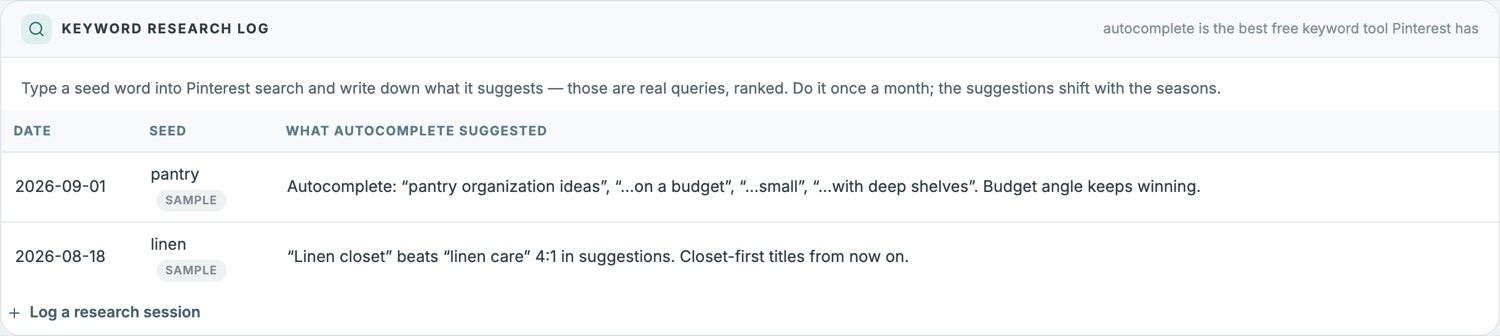
Click into Pinterest search, type your broad term, don't press enter. The dropdown suggestions are real searches, roughly ordered by frequency.
Type meal prep and you'll get meal prep for beginners, meal prep for the week, meal prep containers. Those are your long-tail candidates, straight from Pinterest's own data.
Then go a level deeper — take a suggestion, type it, see what it suggests next. Two or three levels down is usually where the winnable terms live.
2. Related searches, below the results
Run a search and scroll past the first rows of pins. Pinterest surfaces related terms. Where autocomplete narrows, these go sideways — adjacent topics you might not have considered.
3. The text written on top-ranking pins
Search your term and look at the pins at the top. Not the images — the words on them. A pin ranking well is showing you, in large type, the phrase its creator targeted. That phrase is working.
You're not copying anyone. You're reading what the algorithm has already rewarded.
4. The suggested pins on your own boards
Open a board and look at what Pinterest suggests for it. That's Pinterest telling you which keywords it has already associated with you.
If the suggestions are miles from what you intended, that's diagnostic — your board title or description needs work.
Judging whether a keyword is worth it
Pinterest gives you no volume or difficulty numbers, so this is judgement. Four questions:
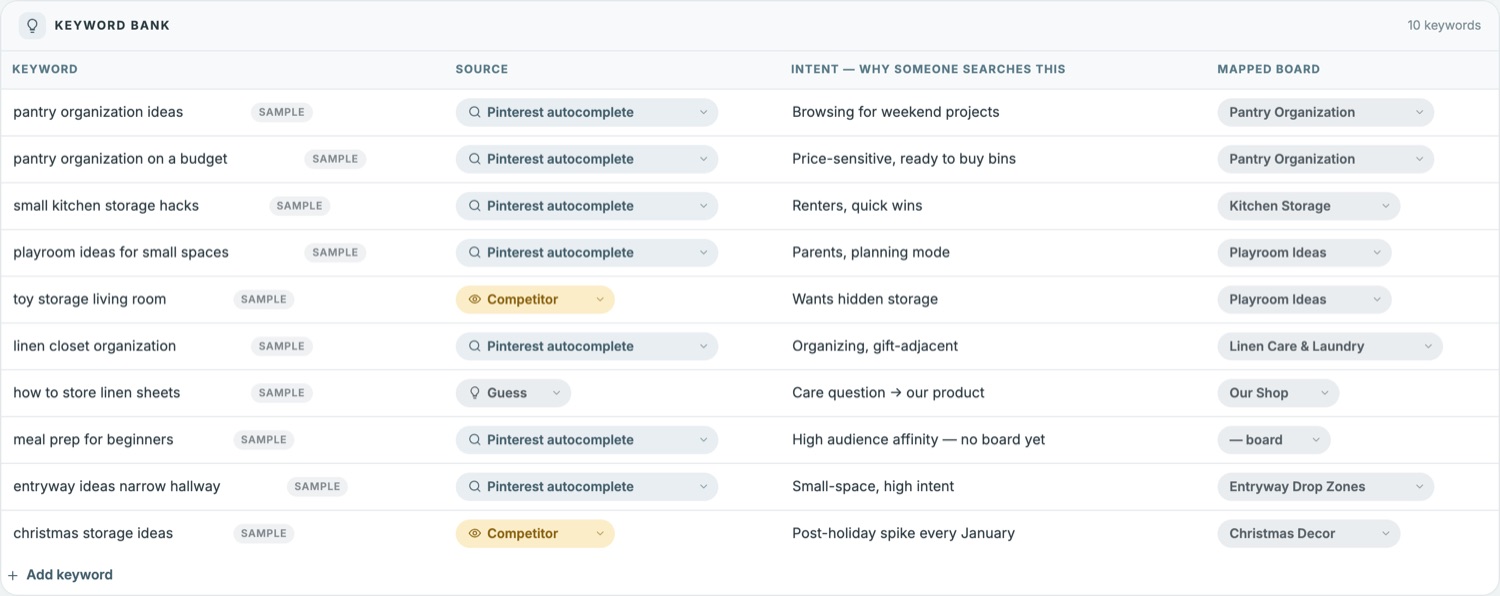
Does it appear in autocomplete? If Pinterest suggests it, people search it. A phrase that never appears probably isn't worth a pin.
How specific is the intent? Home office tells you nothing. Small home office in a bedroom tells you they have a constraint, they're planning a change, and they'll recognize the right pin instantly. Specific intent converts — true in Google, true here.
What's already ranking? All large accounts with polished branded pins means you'll struggle. Mixed or slightly thin results mean there's room. This is judging keyword difficulty by eye, and it works better than it sounds.
Does it match what you offer? Ranking for something adjacent brings traffic that bounces. A save from the wrong person is worth less than nothing.
Where the keyword goes on the pin
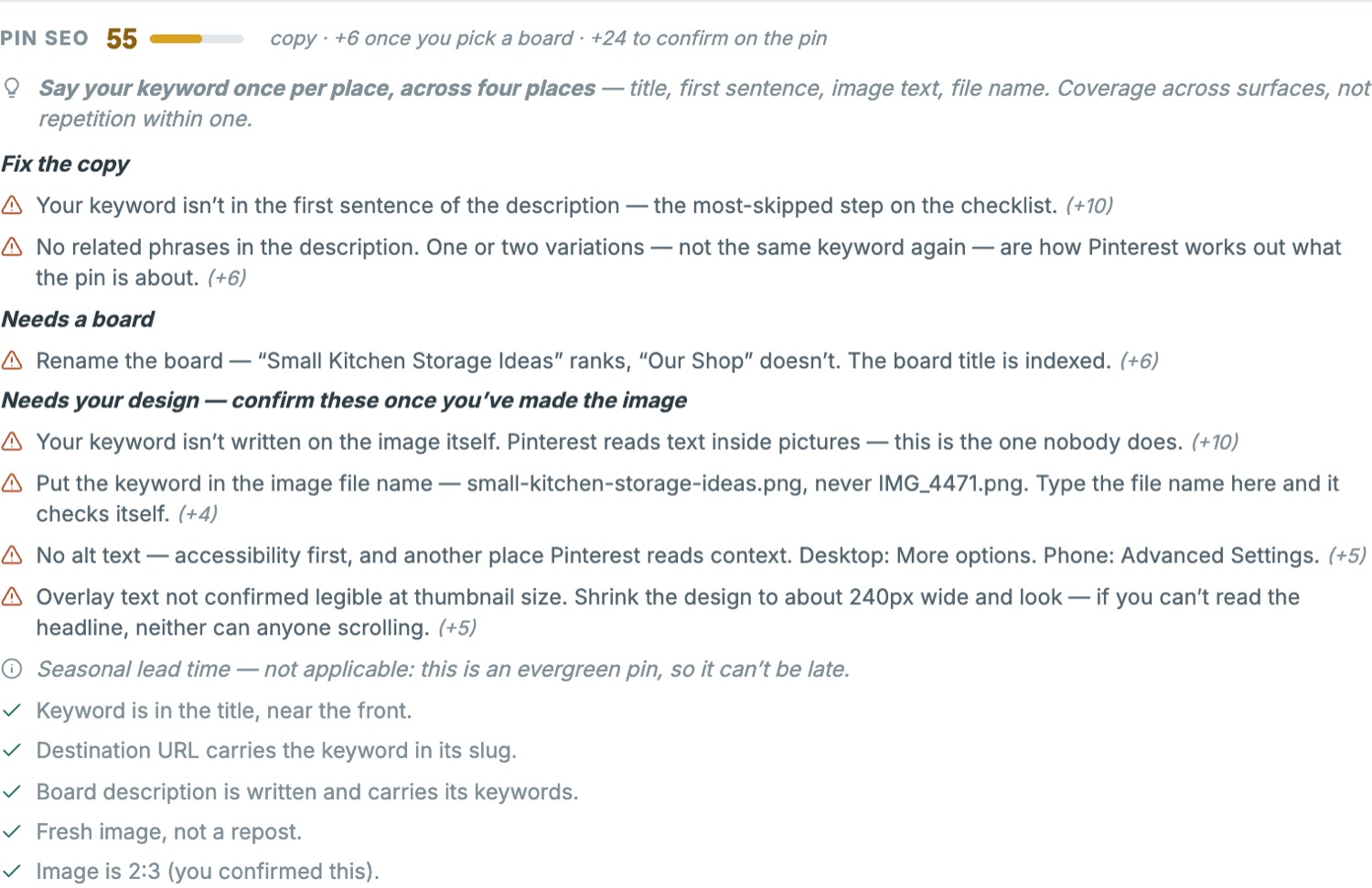
Once you have your phrase, Pinterest reads it in more places than most people use:
- The pin title — front-loaded. Only the first few words show in feed.
- The first sentence of the description — the most-skipped step on this whole list. Say it once, naturally, in the opening line. Then stop.
- On the image itself, as text overlay — Pinterest reads text inside images. Almost nobody does this.
- The image file name — small-kitchen-storage-ideas.png, never IMG_4471.png. Free, five seconds.
- The destination URL slug — the page you're pinning to should carry the keyword too. Pinterest and Google both read it.
- And the board it lands on — which is where the first half of this post comes back. A well-keyworded pin on a board called My Stuff is fighting itself.
Check a pin against every one of those places — and the board it lands on — with the free Pinterest Pin SEO Checker. It scores the pin and lists the fixes in order of what they’re worth. The full picture of how Pinterest finds a pin is in the Pinterest SEO guide.
Two rules matter here.
Say it once per place, not repeatedly. Unlike a blog post, there's no body copy to work a keyword through. Repeating a phrase four times in a two-sentence description reads as spam to Pinterest and to people. Coverage across surfaces beats repetition within one.
And vary your keywords across pins. A common beginner pattern is using the same phrase on every pin in a niche. But people search for the same thing in a dozen ways — green tea benefits, benefits of drinking green tea daily, green tea for metabolism. Each is a separate door into your content. Use the board to hold the topic steady and the pins to chase every variation.
Pin it to the right board first
The board you choose for a pin's first save carries weight, because that context follows the pin.
A pin about small kitchen storage should first live on a board that's genuinely about small kitchen storage — keyword-bearing title, real description. Not a general Home Ideas board you'll sort out later.
Which means the board work happens before the pin work.
And don't put unrelated pins on a board. If a board is about green tea recipes, a black tea pin doesn't belong on it. It dilutes exactly the topical clarity you spent effort building.
What to do this week
- Write descriptions for every board that doesn't have one
- Rename any one-word boards to three-to-five-word phrases — and strip out any dates
- Pick one thing you want traffic to
- Run its broad term through autocomplete and note every suggestion
- Go a level deeper on the two or three most specific
- Check the text on the top-ranking pins for that phrase
- Build the pin around one phrase: title, first line, image text, file name — and the right board
Step one is the highest-value hour you'll spend on Pinterest this month, and most people never do it.
I put the pin-level placement rules into a free one-page checklist — the Pinterest SEO Checklist. Ten checks to run before every pin goes live, including the two almost nobody does.
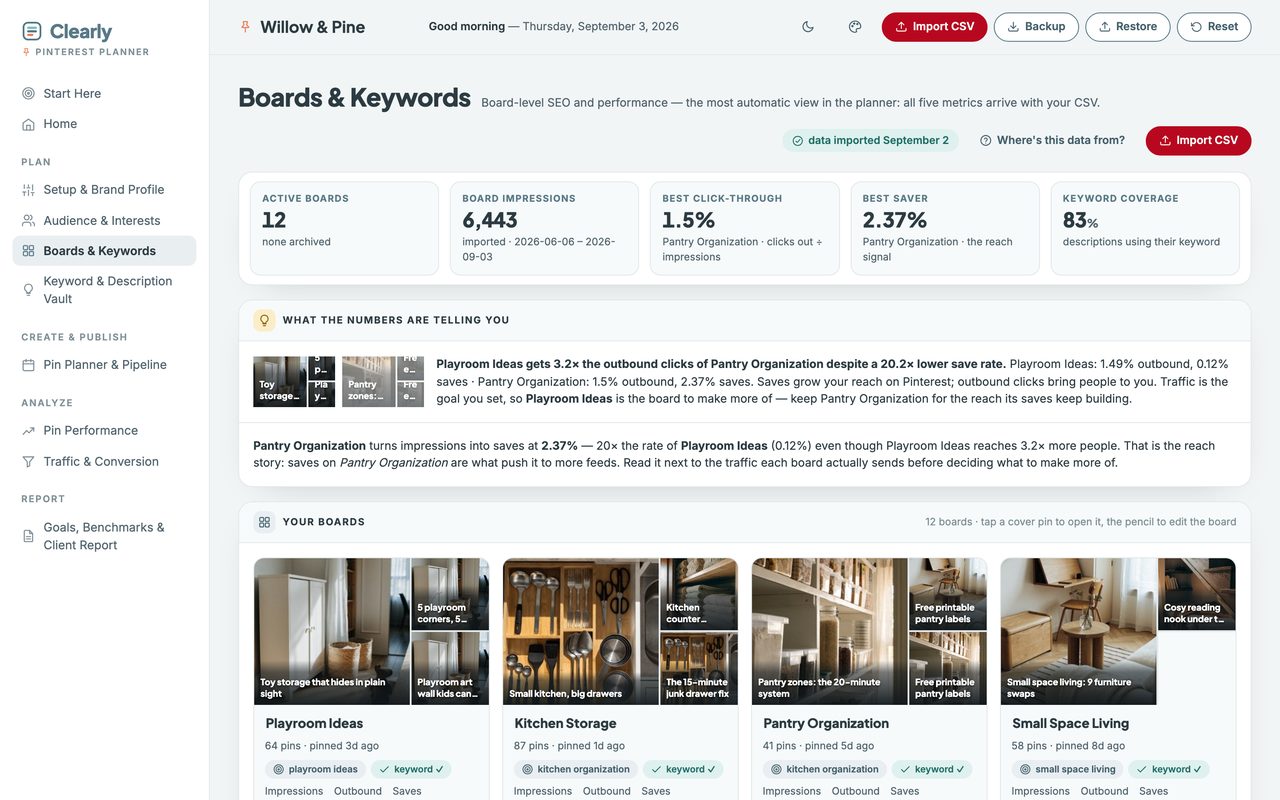
And if you'd rather not track this by hand, it's what I built the Clearly Pinterest Planner for. It scores every pin against those checks before you publish, flags boards missing keywords or descriptions, keeps a keyword vault mapped to each board, and imports your Pinterest analytics so you can see which boards actually send traffic — not just which ones get impressions. There's a two-minute walkthrough of it, recorded start to finish.
Working search as well as Pinterest? The same placement thinking applies to the pages you already have — the keywords you almost rank for are usually a title-tag fix, not a new post.
Where these screenshots come from
Every figure in this post is the Clearly Pinterest Planner.
One file that opens in your browser. It scores each pin against the placement checks above before you publish, flags boards with no keyword or no description, keeps a keyword vault mapped to each board, and imports your Pinterest analytics so you can see which boards actually send traffic — not just which ones get impressions.
Free resource
The Pinterest SEO Checklist
Ten checks to run before every pin goes live. One page, print it and tick it off.
No sequence, no pitching. Unsubscribe whenever.