The keywords you almost rank for.
Most SEO advice starts with keyword research — go find terms, write new pages, wait. It's not wrong, but it skips the fastest thing available to you, which is the work you've already done.
Every site that's been publishing for a while has pages sitting on page two of Google. Real impressions, people genuinely searching, and almost no clicks — because almost nobody goes to page two. Those pages don't need to be written. They need one editing pass.
This is usually called striking distance, which sounds more dramatic than it is. I just think of it as the keywords you almost rank for. And the list is already sitting in a free tool you probably already have.
Why page two is worth more than a new page
A new page starts from nothing. No history, no links, no signal that Google should trust it for anything. It might take months to rank, if it ever does.
A page sitting at position 14 has already won the hard argument. Google has crawled it, indexed it, decided it's relevant enough to show for that query, and put it on the second page. Everything after that is refinement.
The gap between position 14 and position 8 is a different kind of work from the gap between nothing and position 14. The first is editing. The second is a gamble.
Finding them in Search Console
Free, no tools required, about ten minutes.
- Open Google Search Console and go to Performance.
- Set the date range to the last 3 months — you want enough data to be real.
- Tick Average position so the column appears alongside clicks and impressions.
- Open the Queries tab and sort by Impressions, descending.
- Scan for rows where average position is between 11 and 20 and clicks are at or near zero.
That's the list.
You can also export the whole thing — the Export button gives you an XLSX with a tab for queries, pages, countries and devices — and filter it in a spreadsheet if you'd rather work that way.
What a good candidate looks like
Not every page-two query is worth your time. The ones that are have three things.
Real impressions. Something in the hundreds or thousands over three months, not eleven. A query with twelve impressions isn't an opportunity, it's noise. I'd set a floor around 20 impressions and ignore everything below it.
Near-zero clicks. If a query at position 15 is already getting clicks, it's performing above expectation and there's less to gain. The interesting ones are the queries getting seen and never clicked.
Genuine relevance. Sometimes you rank at 14 for something only loosely related to what the page is actually about. Those are usually not worth chasing — you'd be rewriting the page around a query it was never meant to serve.
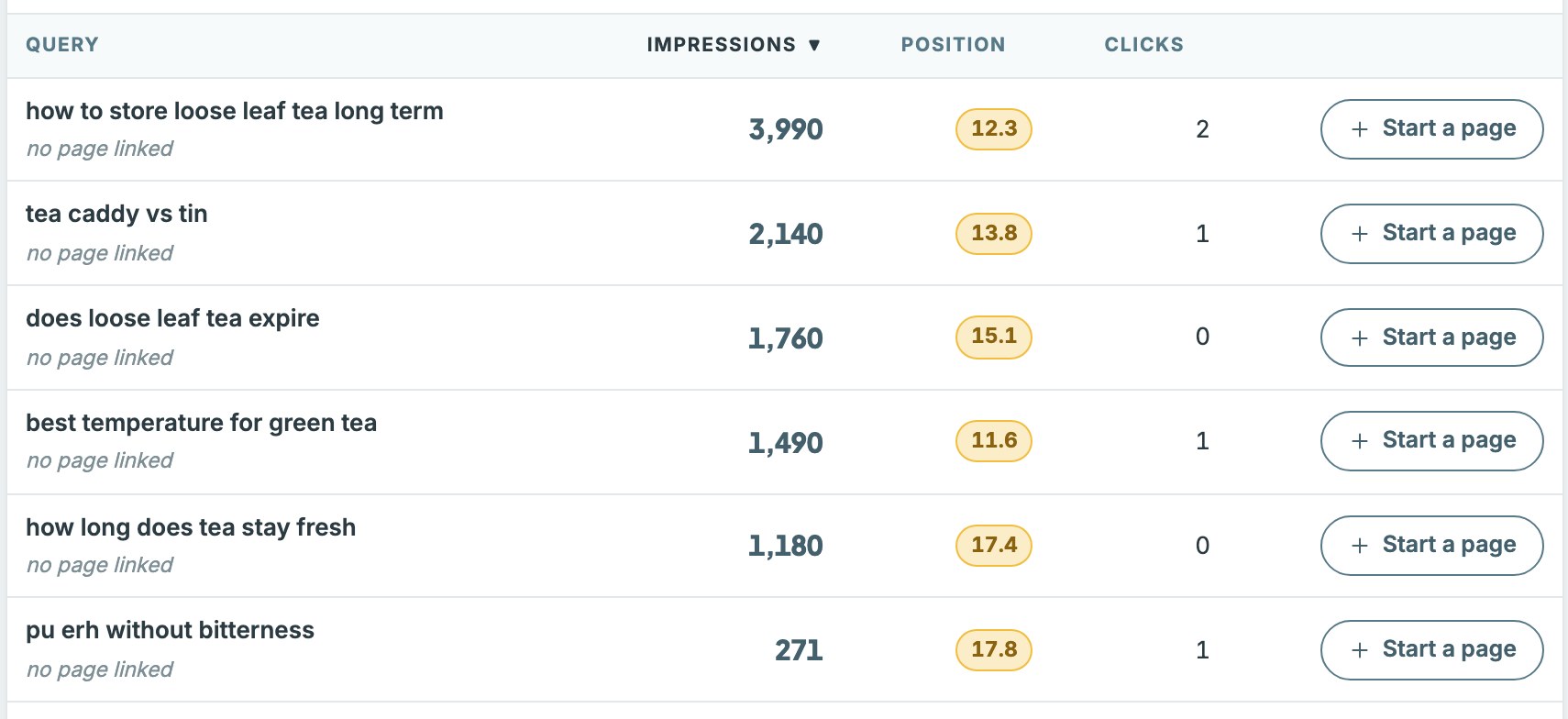
A query at position 12.3 with 3,990 impressions and 2 clicks is the shape to look for. Nearly four thousand people searched, saw the result, and didn't click. That single row is worth more attention than a month of keyword research.
Two things about Search Console data that trip people up
Average position is an average, not a rank. A page showing 14.2 wasn't at 14 — it was at 8 sometimes and 22 other times, and that's the mean across every impression. Don't treat it as a fixed position, and never add these numbers together.
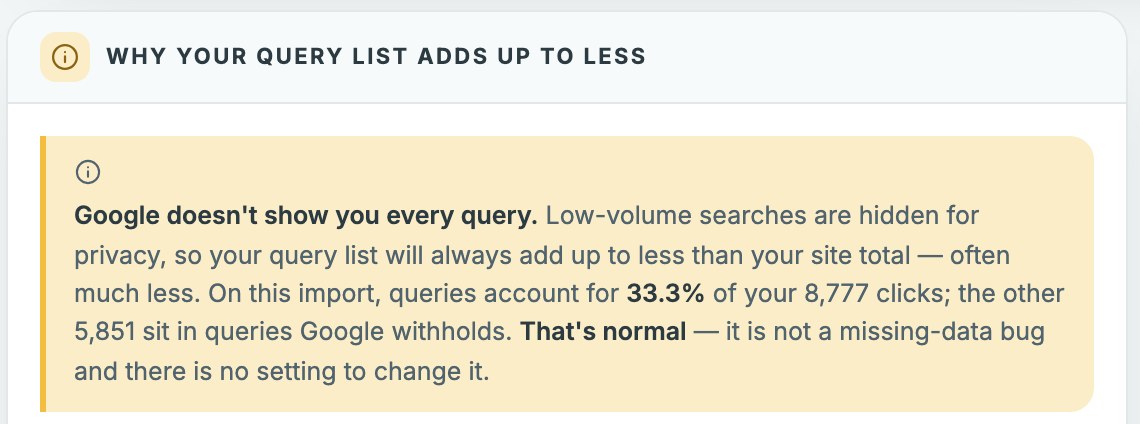
Search Console hides a lot of your queries. Google redacts low-volume searches for privacy, so the Queries tab will never account for all your clicks. It's common for the query list to sum to only a third of your site total. That's not a bug and nothing is broken. It does mean your query list is a sample, not the whole picture.
What to actually change on the page
Once you have a candidate, the fix is almost always placement rather than rewriting.
- The title tag. Is the target phrase actually in it, near the front? This is the single most common miss, and it's the strongest on-page signal you control.
- The H1. Does it match the query's intent, or is it a clever headline that happens to be on the topic?
- The first paragraph. Is the phrase in the opening lines, naturally? If your page takes three paragraphs to say what it's about, that's a problem for readers as well as for Google.
- The headings below. Your secondary phrases belong in the H2s and H3s. Not the same keyword repeated — the old approach of stuffing one exact phrase throughout the page is dated and will get you flagged. Use related phrasing so the page reads as being about a topic rather than repeating a string.
- Internal links pointing at it. Do other pages on your site link to this one, using the target phrase as the anchor text? Two or three internal links with sensible anchors is cheap and it works.
- The URL slug. If the phrase isn't in it and the page is young, it may be worth changing — with a redirect. If the page has history and links, leave it alone; the risk isn't worth it.
Then wait. Rankings move slowly and unevenly, and checking daily will just make you anxious. Give it a few weeks and look again.
The other list worth pulling
While you're in Search Console, there's a second pattern worth knowing.
Look for pages ranking well — position 3 to 8 — with a click-through rate lower than you'd expect for that position. That's not a ranking problem. That's a title tag and meta description problem, and it's a much faster fix. The page is already winning the placement; it's losing the click.
Rewriting a title to be clearer about what the page delivers can move that number in days rather than months. Two different lists, two different jobs, both free.
If you sell on Etsy as well, the same rewrite is being forced on you there — Etsy SEO 2026: the new title rules covers what changed, and why a keyword-stuffed listing title now costs you more than it returns.
The honest summary
Most people never look at position 11–20. They write new content instead, because writing feels like progress and editing feels like admin.
But the pages you almost rank for are the closest thing to free traffic your site has. They've already been indexed, already been judged relevant, already been shown to people who wanted them. They just need the keyword put in the right places.
Ten minutes in Search Console, and you'll have a list.
If you'd rather not do this by hand every month, it's what I built the Clearly SEO Keyword Planner for — it reads your Search Console export, surfaces every query sitting on page two, and scores each page against the placement checks above with a plain-English fix list. There's a two-minute walkthrough of it, recorded start to finish.
Want the equivalent for Pinterest? The Pinterest SEO Checklist is free — ten checks to run before every pin goes live. And if you work Pinterest as well as search, save rate isn't the number that sends you traffic.
Free resource
The Pinterest SEO Checklist
Ten checks to run before every pin goes live. One page, print it and tick it off.
No sequence, no pitching. Unsubscribe whenever.
The planner
It does this automatically.
The Clearly SEO Keyword Planner reads your Search Console export, surfaces every query sitting on page two, and tells you exactly what to fix on each page.